
Introduction
RAM is one of the most important parts of a computer, laptop, smartphone, and other digital devices. Whether you are browsing the internet, playing games, editing videos, or running multiple applications, RAM plays an important role in making your device work smoothly.
In my experience with computers and technology, I have found that many people know about RAM but do not fully understand how it works, why it is important, or how much RAM they actually need.
In this guide, I will explain everything about RAM in simple words, including its meaning, working process, types, benefits, speed, capacity, and how to choose the right RAM for your device.
What Is RAM?
RAM stands for Random Access Memory. It is a type of temporary computer memory that stores data and instructions your device needs while running applications.
When you open a program, browse websites, watch videos, or play games, your computer uses RAM to access important information quickly.
Unlike a hard drive or SSD, RAM does not permanently store your files. When you turn off your computer, the information stored in RAM is cleared.
In simple words, RAM helps your computer perform tasks faster and handle multiple applications at the same time.
How Does RAM Work?
RAM works as temporary storage between your computer’s processor (CPU) and permanent storage devices like SSDs or hard drives.
Here is how it works:
- You open an application on your computer.
- The operating system loads the necessary data from your SSD or hard drive into RAM.
- The CPU accesses the required information from RAM.
- The application runs using the available memory.
- When you close the application, its memory can be released for other tasks.
RAM allows the CPU to access frequently needed information much faster than retrieving it from traditional storage devices.
Why Is RAM Important?
RAM is important because it directly affects how smoothly your device handles everyday tasks.
Here are some major reasons why RAM matters:
1. Faster Performance
RAM helps your computer access active data quickly. This makes opening and using applications more responsive.
2. Better Multitasking
With enough RAM, you can open multiple browser tabs, applications, and programs without experiencing frequent slowdowns.
3. Smooth Gaming Experience
Modern games need memory to load game assets, maps, textures, and other information. Having enough RAM can help reduce memory-related performance issues.
4. Better Video Editing
Video editing software uses RAM to manage video files, effects, previews, and other editing tasks.
5. Improved Overall Experience
Enough RAM helps your operating system and applications run smoothly, especially when you use several programs together.
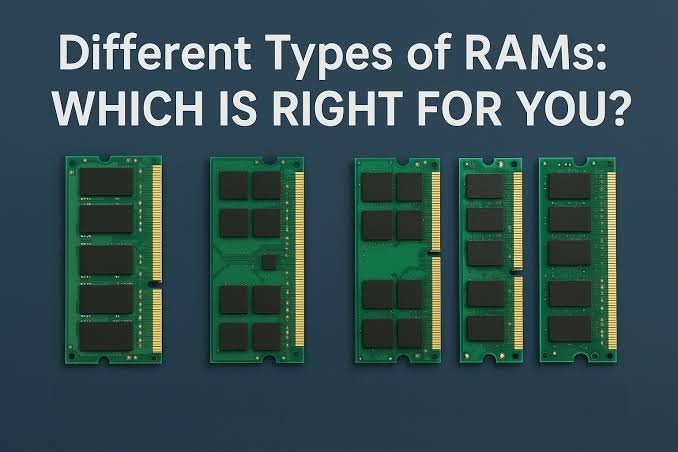
Different Types of RAM
There are several types of RAM used in computers and electronic devices. The most common types include SRAM, DRAM, SDRAM, DDR RAM, and LPDDR RAM.
1. SRAM (Static Random Access Memory)
SRAM stands for Static Random Access Memory. It is a fast type of memory that does not need constant refreshing while powered.
SRAM is commonly used for CPU cache memory because of its high speed.
Main Features:
- Very fast memory access.
- More expensive than DRAM.
- Does not require regular refreshing.
- Commonly used in processor cache.
2. DRAM (Dynamic Random Access Memory)
DRAM stands for Dynamic Random Access Memory. It is commonly used as the main memory in desktop computers and laptops.
Unlike SRAM, DRAM needs to be refreshed regularly to maintain stored information.
Main Features:
- More affordable than SRAM.
- Commonly used as system memory.
- Requires regular refreshing.
- Available in different generations and capacities.
3. SDRAM (Synchronous Dynamic Random Access Memory)
SDRAM is a type of DRAM that operates in synchronization with the system clock.
It improves memory communication with the processor compared with older asynchronous DRAM technologies.
4. DDR RAM (Double Data Rate RAM)
DDR RAM is a popular type of computer memory. It transfers data twice per clock cycle, helping improve memory bandwidth.
Different generations of DDR RAM include:
- DDR
- DDR2
- DDR3
- DDR4
- DDR5
Each generation offers improvements in performance, bandwidth, and power efficiency.
5. LPDDR RAM
LPDDR stands for Low Power Double Data Rate memory.
It is mainly designed for smartphones, tablets, and other portable devices where power efficiency is important.
Difference Between DDR3, DDR4, and DDR5 RAM
DDR3, DDR4, and DDR5 are different generations of memory technology.
| RAM Type | Main Characteristics |
| DDR3 | Older generation with lower bandwidth |
| DDR4 | Better speed and efficiency than DDR3 |
| DDR5 | Newer generation with higher bandwidth and improved efficiency |
DDR5 is generally faster than DDR4, but the best option depends on your motherboard and processor compatibility.
Remember that DDR generations are not interchangeable. You cannot normally install DDR4 memory in a DDR5 motherboard.
How Much RAM Do You Need?
The amount of RAM you need depends on how you use your device.
Here is a general guide:
4GB RAM
4GB RAM may be enough for very basic tasks, such as simple browsing and document editing. However, it can feel limited with modern applications.
8GB RAM
8GB RAM is suitable for everyday activities, including web browsing, online classes, office work, and light multitasking.
16GB RAM
16GB RAM is a good choice for most modern users. It works well for multitasking, gaming, programming, and general productivity.
32GB RAM
32GB RAM is useful for professional video editing, advanced gaming, software development, and demanding applications.
64GB RAM or More
64GB or more is generally suitable for professional workloads, 3D rendering, large projects, virtual machines, and advanced content creation.
What Is RAM Speed?
RAM speed refers to how quickly memory can transfer data. It is commonly measured in MT/s (megatransfers per second).
For example, DDR4-3200 memory has a data transfer rate of 3200 MT/s.
Higher memory speed can improve performance in certain applications, but the actual benefit depends on your CPU, motherboard, memory configuration, and workload.
What Is RAM Capacity?
RAM capacity refers to how much data your memory can temporarily hold.
It is usually measured in gigabytes (GB).
For example:
- 8GB RAM
- 16GB RAM
- 32GB RAM
- 64GB RAM
More RAM allows your computer to keep more active applications and data available without relying as heavily on slower storage.
However, installing more RAM does not automatically make every computer faster.
Difference Between RAM and ROM
RAM and ROM are two different types of memory.
| RAM | ROM |
| Temporary memory | Non-volatile memory |
| Data is lost when power is off | Data is retained without power |
| Used for active tasks | Used for firmware and stored instructions |
| Supports reading and writing | Depends on ROM technology |
RAM is mainly used for running programs, while ROM traditionally refers to non-volatile memory used to store important instructions.
Difference Between RAM and Storage
Many people confuse RAM with storage, but they have different purposes.
RAM: Temporarily stores data that your computer is currently using.
Storage: Permanently stores your files, applications, photos, videos, and operating system.
For example, a laptop with 16GB RAM and a 512GB SSD has 16GB of working memory and 512GB of storage space.
What Happens If Your Computer Has Low RAM?
When your computer does not have enough RAM, you may experience several problems.
Common signs include:
- Slow computer performance.
- Applications taking longer to open.
- Browser tabs reloading frequently.
- Lag while multitasking.
- Slowdowns during gaming.
- Applications freezing or crashing.
When physical RAM becomes insufficient, the operating system may use part of your storage as virtual memory. However, SSDs and hard drives are generally much slower than RAM.
How to Check RAM on Windows
If you want to check how much RAM your Windows computer has, follow these simple steps.
- Open the Start Menu.
- Click on Settings.
- Select System.
- Click About.
- Find the Installed RAM section.
You can also press Ctrl + Shift + Esc to open Task Manager and select the Performance tab to view memory usage, speed, and other details.
How to Choose the Right RAM
Before purchasing RAM for your computer or laptop, consider these important factors.
1. Check Motherboard Compatibility
Always check which RAM generation your motherboard supports.
2. Choose the Right Capacity
Choose RAM according to your daily tasks and software requirements.
3. Check Memory Speed
Make sure your processor and motherboard support the selected memory speed.
4. Consider Dual-Channel Memory
Using two compatible memory modules can provide more memory bandwidth than a single module on systems that support dual-channel operation.
5. Check Laptop or Desktop Compatibility
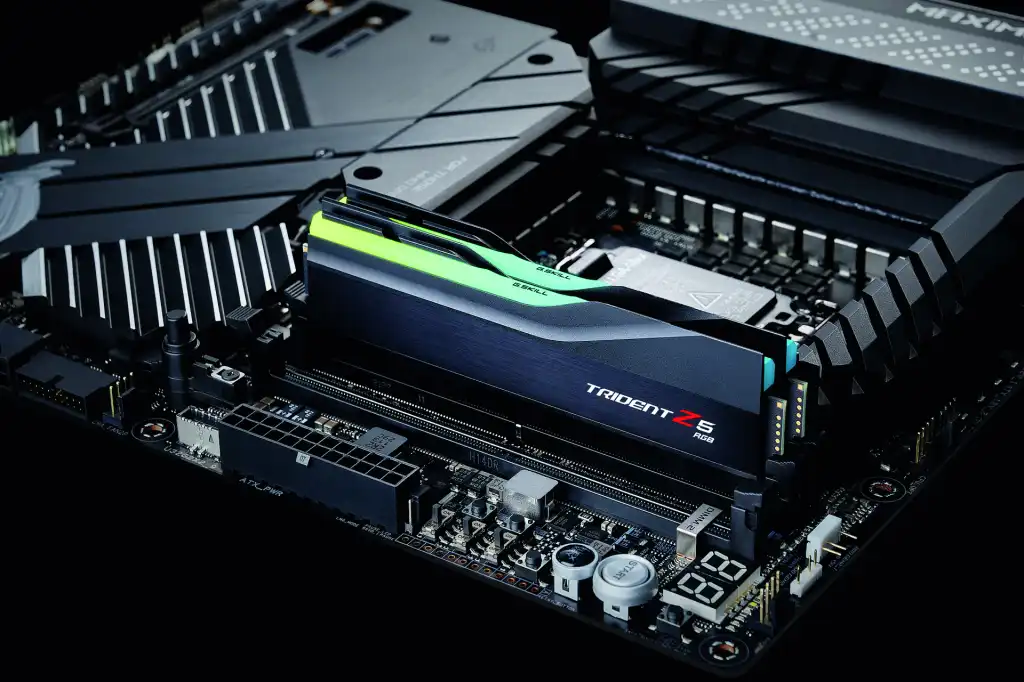
Desktop and laptop memory modules usually have different physical sizes. Desktop systems commonly use DIMM modules, while laptops commonly use SO-DIMM modules.
Can You Upgrade RAM?
Yes, many desktop computers and laptops allow RAM upgrades.
However, some modern laptops have memory soldered directly onto the motherboard, which means the RAM cannot be upgraded.
Before purchasing additional memory, check your device’s maximum supported capacity, available memory slots, and compatibility requirements.
Does More RAM Make a Computer Faster?
More RAM can make your computer faster when your current memory capacity is insufficient.
For example, upgrading from 8GB to 16GB may improve multitasking if your computer frequently runs out of available memory.
However, if your computer already has enough RAM for your daily tasks, adding more memory may not provide a noticeable performance improvement.
Other components, such as your CPU and SSD, also affect overall performance.
Advantages and Disadvantages of RAM
Advantages of RAM
- Provides fast access to active data.
- Improves multitasking performance.
- Helps applications run smoothly.
- Supports modern games and software.
- Reduces the need to access slower storage frequently.
Disadvantages of RAM
- It is more expensive per GB than traditional storage.
- Data is lost when power is turned off.
- RAM capacity is limited by device compatibility.
- More RAM does not always mean better performance.
Conclusion
RAM is an essential component of modern computers, laptops, and smartphones. It helps devices run applications, manage active data, and perform multiple tasks smoothly.
From my experience, choosing the right RAM capacity and generation is more important than simply buying the largest memory available.
For most everyday users, 8GB to 16GB can be a practical starting point, while gamers and professionals may benefit from 16GB, 32GB, or more depending on their workload.
Before upgrading, always check your device’s compatibility, supported memory speed, and maximum capacity. The right RAM can help you get a smoother and more efficient computing experience.
Frequently Asked Questions (FAQs)
1. What does RAM stand for?
RAM stands for Random Access Memory. It is temporary memory used by computers and other devices to store active data and instructions.
2. What is the main purpose of RAM?
The main purpose of RAM is to provide fast temporary storage for data that the CPU and applications are currently using.
3. Is 8GB RAM enough?
8GB RAM is enough for basic everyday activities such as browsing, office work, and online classes. However, demanding applications may require more memory.
4. Is 16GB RAM good for gaming?
Yes, 16GB RAM is a good starting point for many modern PC games. Some demanding games and multitasking setups may benefit from 32GB.
5. Which RAM is better, DDR4 or DDR5?
DDR5 offers higher bandwidth and newer technology than DDR4. However, the right choice depends on your processor and motherboard compatibility.
6. Can I use two different RAM sizes?
In many systems, you can use RAM modules with different capacities, but performance and compatibility may vary. Matching modules are generally recommended.
7. Does RAM affect gaming performance?
Yes. Having enough RAM can improve gaming smoothness and reduce memory-related slowdowns. However, the graphics card and processor are also very important.
8. Can I increase RAM on my laptop?
Some laptops support RAM upgrades, while others have soldered memory. Check your laptop specifications before purchasing additional RAM.
9. What is the difference between RAM and SSD?
RAM temporarily stores active data for fast access, while an SSD permanently stores files, applications, and the operating system.
10. Does RAM store data permanently?
No. Standard system RAM is volatile memory, which means its stored data is lost when the device loses power.
11. What is the fastest type of RAM?
Among common system memory generations, DDR5 offers higher data transfer rates than DDR4. Specialized memory technologies and configurations may differ.
12. How do I check RAM usage?
On Windows, open Task Manager using Ctrl + Shift + Esc and select Performance > Memory to view your RAM usage.

